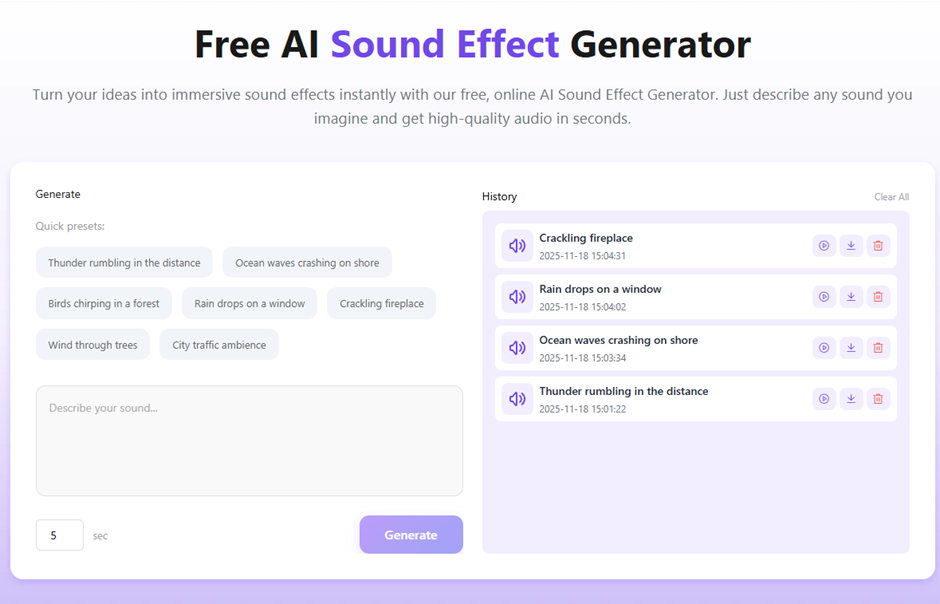
If you’ve ever spent an afternoon digging through a massive sound library just to find a decent rainstorm clip — only to discover it costs $15 and requires attribution — you already know the pain. Audio production has long been the unglamorous bottleneck of content creation. But that’s changing fast, and an AI sound effect generator is at the center of that shift.
The Real Problem With Traditional Sound Libraries
The workflow most creators still use in 2025 looks something like this: open a library, type a vague keyword, scroll through dozens of mismatched results, preview five clips that are almost right, settle for one that’s close enough, and then cross your fingers on licensing.
It’s slow. It’s frustrating. And “close enough” audio is exactly the kind of thing audiences notice without knowing why — it makes polished visuals feel slightly off.
The deeper issue is that traditional libraries are reactive. They only offer sounds that someone else already recorded and uploaded. Your specific vision — say, a muffled subway rumble layered with distant street music — almost certainly doesn’t exist as a pre-made file.
What an AI Sound Effect Generator Actually Does
Modern generative audio tools flip that entire process on its head. Instead of searching for a sound that already exists, you describe the sound you need — and the AI builds it from scratch in seconds.
That’s the core mechanic of today’s AI sound effect generator: natural language in, production-ready audio out.
Type “soft wind rustling through tall pine trees at dusk” and you get exactly that — layered, textured, and atmospherically accurate. Type “deep sci-fi spaceship hum with a low mechanical vibration” and the system synthesizes it on demand. No searching. No compromises. No licensing headaches.
The technology draws on large-scale audio models trained on thousands of hours of real-world and synthesized sound data. The result is audio that doesn’t just match your prompt — it captures the feeling behind it.
How to Use an AI Sound Effect Generator: A Step-by-Step Walkthrough
One of the biggest selling points of tools like AI Sound Effect Generator is that the learning curve is essentially zero. Here’s exactly how the process works — from blank page to downloadable audio file.
Step 1: Write a Descriptive Text Prompt
Navigate to the tool in your browser. No account, no download, no setup required.
In the prompt field, describe the sound you want in plain English. The more specific you are, the better your result will be. Vague prompts like “rain” work fine, but detailed prompts unlock the real power of the technology.
Less effective: rain More effective: heavy rain hitting a tin roof with distant rolling thunder
Think about:
- Environment — indoor, outdoor, urban, nature, space, fantasy?
- Intensity — gentle, moderate, intense, chaotic?
- Distance — close-up, mid-range, far away?
- Texture — smooth, sharp, layered, echoing?
You don’t need to use technical audio terminology. Describe it the way you’d describe it to a friend, and the AI handles the translation into sound.
Step 2: Set Your Duration
After entering your prompt, choose how long you want the clip to be. The free tool currently supports durations up to 10 seconds — which covers the vast majority of use cases, from a quick transition stinger to a loopable ambient background.
Match the duration to your specific need:
- Short (1–3 sec): UI sounds, notification tones, impact effects, transition cues
- Medium (4–7 sec): Scene-setting ambience intro, character action sounds
- Full (8–10 sec): Loopable background audio, atmospheric environment tracks
Step 3: Generate and Preview
Hit “Generate.” The AI processes your prompt and produces a finished audio clip in seconds — no loading bar that runs for five minutes, no queue system.
Once it’s ready, preview it directly in the browser. Listen critically: does it match the mood and texture you were going for? If it’s close but not perfect, tweak your prompt and regenerate. Try adding or removing adjectives, shifting the environment description, or adjusting intensity language.
Pro tip: Generate two or three variations of the same prompt with slightly different wording. Comparing versions side by side often reveals a clear winner — and sometimes a happy accident that’s better than what you originally imagined.
Step 4: Download and Deploy
When you’ve landed on a sound you love, download it instantly as a high-quality MP3 file. No watermark. No expiration. No hoops to jump through.
Every generated file is royalty-free — meaning you can drop it directly into a YouTube video, a commercial, a game build, or a client project without touching a licensing agreement. It’s yours, outright, from the moment you download it.
Use Cases: Who’s Actually Using This — and How
The versatility of a good AI sound effect generator is one of its most underappreciated qualities. Here’s a detailed look at how creators across different industries are integrating it into their real workflows.
Video and Film Production
Independent filmmakers and YouTube creators share one common constraint: they need professional audio, but they don’t have a sound design budget.
AI-generated audio fills that gap without compromise. Need authentic footsteps on a gravel driveway? A cinematic swell as a scene transitions? The ambient hum of an old hospital corridor at night? Describe each one, generate, done.
The traditional alternative — hiring a Foley artist for a short film, or licensing individual effects from premium libraries — can run into hundreds of dollars before you’ve even finished picture lock. With AI-generated sound effects, those costs disappear entirely. And unlike stock libraries, you’re not handing your audience a sound they’ve subconsciously heard in fifty other videos.
Example workflow: A travel vlogger uses the tool to create custom ambient tracks for each destination — the specific sound of a Moroccan souk, a Tokyo subway platform, a Norwegian fjord in wind — rather than relying on generic “world music” beds from a stock site.
Game Development and Interactive Media
Indie game developers face a relentless tradeoff between creative ambition and limited resources. Sound design is almost always the first thing that gets cut when budgets tighten — which is why so many indie titles ship with audio that feels generic or mismatched.
An AI sound effect generator changes that calculus entirely. Custom sound fx for every environment, weapon, character action, and UI interaction can be generated on demand — and iterated on just as easily. Prototyping a new game mechanic? Generate placeholder audio in two minutes, not two days. Deciding between two attack sounds for a boss character? Generate both, test both, keep the winner.
For VR and immersive media specifically, audio quality isn’t a nice-to-have — it’s the primary driver of presence. AI-generated ambience that’s tuned to the specific environment of each scene makes a measurable difference in how real the experience feels.
Example workflow: A solo dev building a horror game uses the tool to generate dozens of distinct environmental sounds — creaking floorboards, distant whispers, the specific mechanical groan of an old elevator — without needing to license a single asset.
Podcasting and Audio Storytelling
Atmosphere is the difference between a podcast that plays in the background and one that pulls listeners in. Skilled podcast producers have known this for years — but the tools to build immersive audio environments used to require either significant technical skill or a significant budget.
With text-to-sound conversion, podcasters can create tailored background ambience, scene transition cues, and signature sound branding without any audio production expertise. Describe the opening soundscape for each episode. Generate unique stingers that match your show’s tone. Build an audio identity that sounds custom-made, because it is.
Example workflow: A true crime podcast producer generates distinct ambient audio for each episode’s setting — a 1940s newsroom, a rural farmhouse at night, a crowded courtroom — giving each story an immersive, cinematic feel that sets the show apart.
Marketing, Advertising, and Social Media
In short-form video content, the first three seconds determine everything. Creators and marketers who’ve cracked the attention algorithm know that a distinctive opening sound — a sharp impact, an unexpected tone, a brand-recognizable audio cue — keeps viewers from scrolling past.
AI-generated sound effects give marketing teams a genuine competitive edge here. Instead of using the same royalty-free jingle that every other brand is licensing, you can generate something completely unique to your product, your tone, and your audience.
The applications span the full content calendar: transition sounds for Instagram Reels, alert tones for TikTok notifications, atmospheric backgrounds for LinkedIn thought-leadership videos, and punch-up effects for client presentation decks.
Example workflow: A social media team for a consumer tech brand generates a custom “notification ping” and a set of sleek UI interaction sounds that become part of their recognizable audio brand across all platforms — no sound designer needed.
Education and E-Learning
Educators creating online courses, training modules, or interactive learning content use sound to reinforce engagement and signal transitions between concepts. A well-placed audio cue can mark the end of a lesson section, reward a correct quiz answer, or add narrative texture to a storytelling segment.
With free AI-generated sound effects, educators can add this layer of polish without diverting budget from course content. Generate quiz success sounds, background ambience for reading activities, or narrative scene-setting audio for storytelling exercises — all tailored to the age group and subject matter.
What to Look for in a Free AI Sound Effect Generator
Not all tools in this space deliver the same quality or flexibility. Before committing to one, run it through these four criteria:
Audio quality: Does it produce clean, layered audio with real depth — or flat, tinny clips that betray their AI origin? Test with something nuanced, like “light rain on leaves with a distant car passing.”
Prompt fidelity: Does the output actually reflect what you described? The gap between prompt and result is where most tools fall short. A good generator nails the feel of your description, not just the literal keyword.
Usage rights: Confirm that all generated audio is genuinely royalty-free for commercial use — not just personal projects. Read the fine print.
Zero friction access: If a tool requires an account, a credit card, or any kind of trial enrollment just to generate one test clip, that friction cost compounds fast. The best free tools are open and immediate.
Conclusion
Audio production doesn’t have to be the bottleneck anymore. The technology now exists to go from a creative idea to a finished, professional-grade sound in the time it used to take just to open a library browser.
An AI sound effect generator isn’t a novelty toy — it’s a practical, time-saving tool that removes one of the most persistent friction points in any content workflow. Whether you’re cutting a film, shipping a game, producing a podcast, or building a brand, the sounds you need are one sentence away.
Ready to hear the difference? Try AIDubbing’s free AI Sound Effect Generator — type your first prompt and have a custom, royalty-free sound file in under 60 seconds. No signup. No catch.