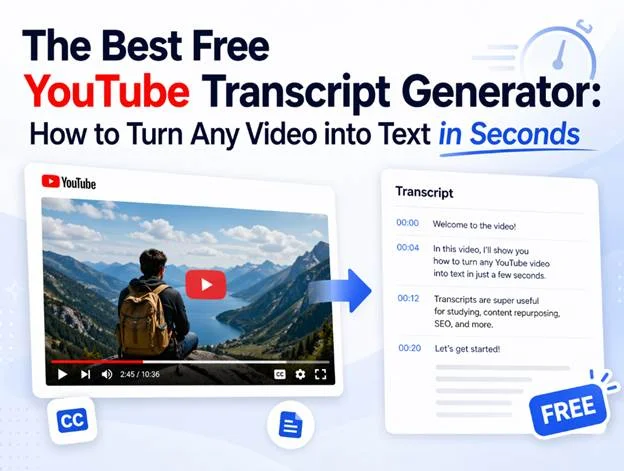
Let me ask you something. How many times have you watched a 45-minute YouTube tutorial, only to realize you need to scribble down every key point? Or maybe you’re a content creator who wants to repurpose a brilliant interview into a blog post—but the thought of manual transcription makes your wrist ache.
You’re not alone. Millions of people face this exact frustration every single day. And here’s the good news: you don’t need to pay a fortune or spend hours typing anymore. A YouTube transcript generator can do the heavy lifting for you.
In this guide, I’ll walk you through exactly how these tools work, why they matter more than ever in 2026, and how you can start using one today—no credit card required.
Why You Need a Free YouTube Transcript Generator Right Now
Let’s be honest. Video is king. But text still rules when it comes to:
- Searchability – Google can’t “watch” your video, but it can index a transcript.
- Accessibility – Not everyone can turn up the volume. Captions and transcripts open your content to a wider audience.
- Repurposing – One video can become a blog post, email newsletter, social media thread, or even an ebook chapter.
A reliable free YouTube transcript generator bridges the gap between the video content people love and the written format they need. Whether you’re a student trying to capture lecture notes, a marketer building a content library, or a podcaster expanding into written content, the right tool saves you hours of tedious work.
And here’s the kicker: the best tools don’t just spit out raw text. They format it, timestamp it, and make it actually usable.
How a Free YouTube Transcript Generator Actually Works
You might be wondering: Is this going to be complicated? Not at all.
Most modern transcript generators follow a simple three-step process:
- Paste the YouTube URL – No downloads. No extensions. Just copy and paste.
- AI processes the audio – Advanced speech recognition converts spoken words into written text with surprising accuracy.
- Download or edit – Grab your transcript as a .txt, .srt, or even a formatted document.
The technology behind this has improved dramatically. We’re no longer stuck with the robotic, error-filled captions of five years ago. Today’s AI understands context, accents, and even industry jargon.
Real-World Ways to Use a Free YouTube Transcript Generator
Theory is nice. But let’s talk about how real people are using these tools to save time and grow their work.
1. The Overwhelmed Student
Meet Jake. He’s a college junior taking an online data science course. His professor uploads two-hour lecture videos every week. Jake used to pause, rewind, and type notes for hours. Now? He runs each video through a free YouTube transcript generator, gets a clean text file, and highlights the key concepts in minutes. His study time dropped by 70%. His grades? They went up.
2. The Solo Content Creator
Sarah runs a small YouTube channel about sustainable living. She interviews experts, reviews products, and shares tips. Every month, she turns her three best videos into blog posts to boost her SEO. Before, she hired a freelancer for $50 per video. Now she uses a free YouTube transcript generator to create the first draft, spends 15 minutes editing for flow, and publishes. Her website traffic has doubled in six months.
3. The Remote Team Lead
Marcus manages a distributed team across three time zones. His company records all-hands meetings and training sessions on a private YouTube channel. Not everyone can attend live, and watching full recordings is inefficient. Marcus generates transcripts for every meeting, uploads them to the team wiki, and lets people search for exactly what they need. Onboarding new hires? It used to take a week. Now it takes two days.
What to Look for in a Free YouTube Transcript Generator
Not all tools are created equal. Before you commit, check for these features:
- No sign-up required – The best tools respect your time (and your inbox).
- High accuracy – Look for AI that handles multiple speakers and background noise.
- Timestamped output – Essential if you need to reference specific moments.
- Multiple formats – .TXT for reading, .SRT for subtitles, .DOCX for editing.
- Language support – Because great content exists in every language.
A truly valuable free YouTube transcript generator won’t slap a paywall on you after the first 30 seconds of audio. It will give you a complete, usable result—no strings attached.
Common Mistakes to Avoid
Even the best tool won’t help if you use it wrong. Here are three pitfalls I see all the time:
Relying on raw output without editing. AI is impressive, but it’s not perfect. Always skim for errors, especially with names, technical terms, and numbers.
Ignoring formatting. A giant wall of text is hard to read. Break your transcript into paragraphs. Add speaker labels if there are multiple voices.
Forgetting about SEO. If you’re publishing the transcript online, treat it like any other piece of content. Add a compelling headline, internal links, and a brief introduction. A free YouTube transcript generator gives you the foundation—you still need to build the house.
Final Thought: Your Content Deserves to Be Found
Video is powerful. But in a world drowning in content, the creators who make their work discoverable are the ones who win. Saveto AI free YouTube transcript generator isn’t just a convenience tool. It’s a strategy. It turns passive viewers into active readers. It makes your expertise searchable, shareable, and scalable.
So here’s my challenge to you: pick one video you’ve created or watched recently. Run it through a free YouTube transcript generator today. See what happens when your words break free from the screen and start working for you 24/7.
The best part? It won’t cost you a dime. But the time you’ll save? That’s priceless.